
What an out of hours callout log needs to hold, and what makes engineers use it
By Jay Alcock
An out of hours callout log is how a business with engineers on call records the emergency jobs that come in after the office has closed. It takes five fields, and only three of them are the engineer's to answer: the customer or site, who is logging it, and what the call is about. The call number, the date and the status fill themselves in, and the other two are a single tap. The harder part is not what the log holds: it is making it quicker than whatever the engineer would otherwise do at two in the morning.
What does an out of hours callout log need to hold?
Five fields. The first three are required, and the form will not send until all three have an answer. On Ultra Vision Fire & Security's form they are:
- Customer or site. Typed in, not picked from a list.
- Who is logging it. Picked from a list of the engineers.
- What the call is about. Free text, as long or as short as it needs to be.
- Type of work, labelled Discipline on the form. One tap, and it can be left unset. For a fire and security firm that means fire, intruder, CCTV, gates and the rest.
- Urgent. Always carries an answer, and it starts on No, so it only costs a tap when the answer is yes.
Everything that is admin rather than information fills itself in: the call number, the date, and the status that tells the office this one is still open. Nobody should be typing a call number at two in the morning.
It records the date, not the time. If the hour a call came in matters to you, and it will if you work to response times written into a contract, that is a field you would have to add and this one does not have.
What it does not hold is anything about finishing the job. It logs, and that is all it does. Once the callout has been dealt with, somebody in the office marks it off in the spreadsheet or on the board's own screen, exactly as they did before.
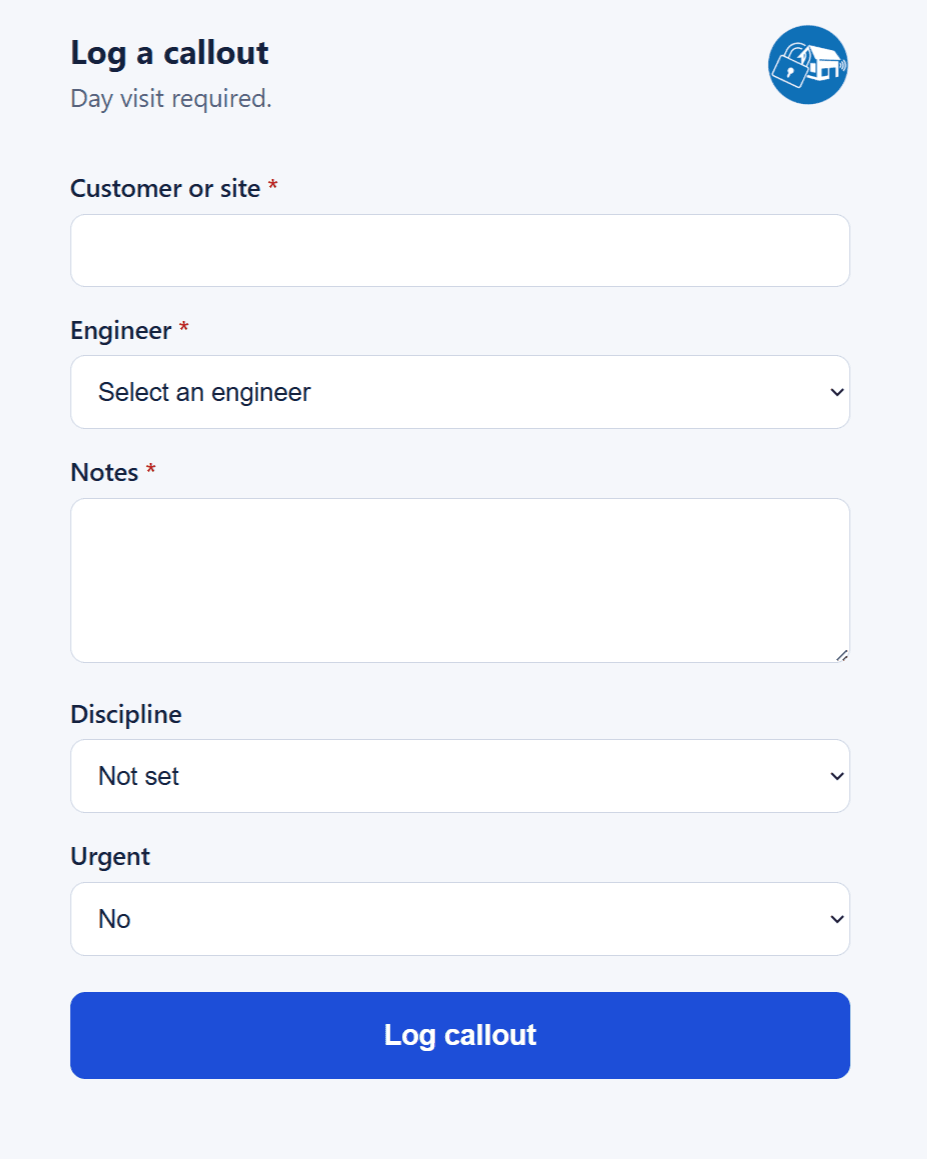
That is the whole page, and it is worth setting next to the weekly van check we built for the same firm, because the two are built for different jobs. That one exists to make sure nothing is skipped: every item answered, the registration matched, before it will send at all. This one exists to get what happened out of an engineer's head and somewhere the office will see it, asking as little as the call allows and leaving room to say more when the call needs it.
The reason for keeping it that bare is the hour. At three in the morning an engineer wants to put down what happened, see that it has gone somewhere, and stop. They should be able to write as much detail as the call deserves without being asked for ten fields they have no answers to, and they should not have to check in the morning whether it worked. Everything below follows from that.
Could you do this with a Microsoft Form?
For collecting the answers, yes, and it is the right first thing to try. Where it stops is where the answers go. A Form writes to its own response sheet, so something still has to move each response onto the tab the office works from, give it the next call number, and decide what happens when that step fails overnight. We already had the Microsoft 365 plumbing from the board we built them, so writing straight into the workbook meant fewer moving parts than a form plus a flow.
The page the engineer sees is the small half of it.
Why does it have to beat the workaround, not the official process?
Because at that hour nobody is choosing between your form and the official process. Ultra Vision answer callouts twenty four hours a day, so this runs every night of the year. Before the form, an engineer taking a callout out of hours at home had two routes, and neither was quick. The sheet was the record, so one was to open the Excel app on a phone, find the right tab, scroll to the right row and type into individual cells, where the cell next to the right one is a thumb's width away. The other was to email the details through to the office, which moves the work rather than finishing it: somebody picks the overnight calls out of an inbox in the morning and puts them on the sheet.
Both were in use, and roughly evenly. The right jobs got prioritised either way. It just meant the overnight picture was spread across an inbox and a spreadsheet until somebody sat down and put it back together.
So the test we wrote down before building anything was not whether the form beat the spreadsheet. It had to be at least as easy as sending that email, because the email was the easy option. Any night the email was easier than the form would be a night the form did not get used. It is why the form is a page the engineer opens from a bookmark, with nothing to install and no account to create.
Every callout now comes through it. Nobody emails the office and nobody opens the spreadsheet at night.
The saving that follows is not at three in the morning, though, and this is the part we did not expect. It lands at nine the next day. Nobody is picking overnight calls out of an inbox, and nobody is going back to an engineer to check a row that a phone keyboard put in the wrong column. Whatever came in overnight is already on the sheet, in the same shape as everything else, before anyone sits down.
We are reliably getting to customers quicker than we were before, and what used to take the engineers a few minutes of opening up a spreadsheet in the middle of the night now takes about fifteen seconds on their phone.
Rob Drew, Director at Ultra Vision Fire & Security
How does the engineer know the callout actually landed?
A confirmation email, and what makes it work is when it is sent. It goes out only after the write to the sheet has been confirmed. So it is not a notification that something was attempted. It is proof the callout is logged, which means the engineer can stop thinking about it and go back to bed.
It goes to whoever logged the callout, which is what the list of engineer names on the form is for: nobody types an email address at that hour. The same email copies the office. That copy is not carrying any weight, because the callout is in the sheet by the time it sends. It just means somebody in the office knows a call came in overnight without having to go and look.
If the write fails, no email is sent, and the page says it was not saved and to try again. The engineer falls back to the old way, which is annoying at the time and far cheaper than the alternative. A write that fails quietly is not found out until the morning, and by then the details of a phone call taken at three are whatever somebody can still remember.
If the write succeeds and the email fails, the page still shows success, with the call number on it. That looks wrong until you picture the alternative. An engineer sees an error, assumes nothing was saved, and logs the same callout again. Now the office has two of them and no way to tell which is real. The automated email is the receipt, not the record.
What happens when the engineer has no signal?
The page is a single small file with nothing else to load, so it opens on a bad connection. With no signal at all it will not open unless the phone still has it from last time, and the engineer is back to sending the email. If a submission does not get through, everything typed stays on the screen, because the form only clears on success.
Which leaves the case worth designing for: the request reached us and the reply did not. The row is written and the email sent, while the phone reports a network problem. The engineer retries, and because nothing was cleared the second submission is character for character the first, so the form matches the same customer, engineer and notes from the same day. It hands back the call number already assigned and writes nothing. No second row, no second email, and the confirmation from the first attempt is already sitting in their inbox.
Should the log have a field for urgency?
Ours has one, and it is the only field anyone has asked us to add since it went live in July. The office asked for it, not the engineers.
A callout taken out of hours can be anything from something that wants doing over the next couple of weeks to something that needs attending the next morning. The form gave the office no way to tell those apart. So the engineers had been doing it themselves, by writing a sentence into the notes to say that this one was urgent and needed treating as a priority.
The urgency was already being recorded. It was being recorded as a sentence in a free text box, where nothing downstream could act on it.
The field we added is a dropdown that starts on No. An ordinary callout costs nothing, because nobody touches it. An urgent one costs one tap instead of a sentence.
The other half of it is what the flag does once it is set. A callout marked urgent comes up red on the board in the office and sits pinned above everything else waiting. What it settles is what the office sees first when they walk in, which is when the priority actually gets acted on.
Can the callout log write into the Excel spreadsheet you already use?
Ultra Vision's callouts go into the same Excel workbook the office has always had, on the same tab. The board on the office wall reads that tab too. Nothing was replaced, and the form is simply a faster way into what was already the record.
The board, the logger and the rest of the internal tools we built for Ultra Vision are on the Ultra Vision case study.
Questions
- What is an out of hours callout log?
- It is the record of emergency jobs that come in after the office has closed: who logged it, which customer or site it was for, and what the problem was. It is what the office works from in the morning.
- What makes engineers actually use an out of hours callout log?
- An out of hours callout log gets used when it is quicker than whatever the engineer would otherwise do, which is usually an email to the office. In practice that means nothing to install and nothing to log into, the fewest fields the job allows, and a confirmation that tells the engineer it landed so they are not checking in the morning.
- What happens if the confirmation email does not arrive?
- The callout form still shows the job as logged, with its call number, because the row is already written. The email is the receipt, not the record, and the alternative is the same callout being logged twice by someone who could not tell.
- Can an out of hours callout log replace job management software?
- Not the one we built, and it does not try to. An out of hours callout log records that a call came in and what it was about. Completing the callout, booking the visit and everything after that stays wherever the office already does it.