
How to get van drivers to do vehicle checks: follow the van, not the driver
By Jay AlcockUpdated
Here is how to get van drivers to do vehicle checks: put the check on their phone with no setup, and track the van, not the driver. At Ultra Vision Fire & Security, the obstacle was the app for their fleet management software: every engineer would have needed a login and a download. We built a web form instead, and sent the chasing to the person who knows who has which van this week.
Does a weekly check replace the driver's own check?
No. GOV.UK's guidance says the driver is responsible for making sure the van is safe to drive, and should do a walkaround check before the journey. A weekly check sits on top of that.
What it adds is a written check that someone else sees. That matters when vans go home with the engineers, because the office cannot check a van that is not there. The form collects the checks, but the official record stays in the company's fleet management software.
It is not designed to meet anyone's record-keeping rules. We do not put it forward as proof for an insurer, the Health and Safety Executive or the Driver and Vehicle Standards Agency.
Why was the app the obstacle?
Before a single check, each engineer would have needed to create a login and download the app for their fleet management software. So until the form, a fault reached the office when an engineer raised it.
That works for anything that stops a van. A minor fault that does not stop it has no obvious moment to be mentioned. It tends to wait until it becomes something bigger, or until a bigger fault sends the van in and it needs several repairs at once. The weekly check gives every small fault a moment to be mentioned, and sends it straight to the office.
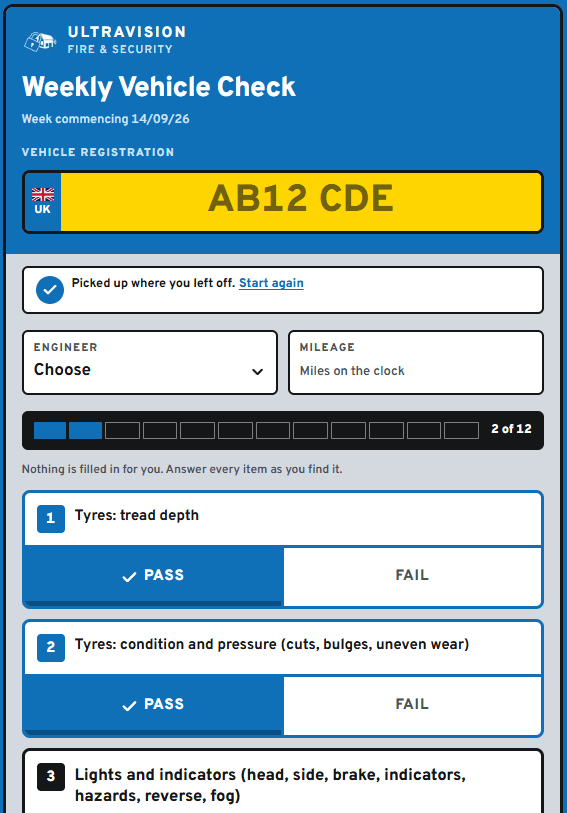
The form is a web page the engineer opens on their phone. It does not replace the fleet management software, which stays the official record. That software cannot import a spreadsheet, so the fleet manager copies each check into it by hand. The checks land in a spreadsheet with a sheet for each van, plus one log in date order, laid out to make that copying quick.
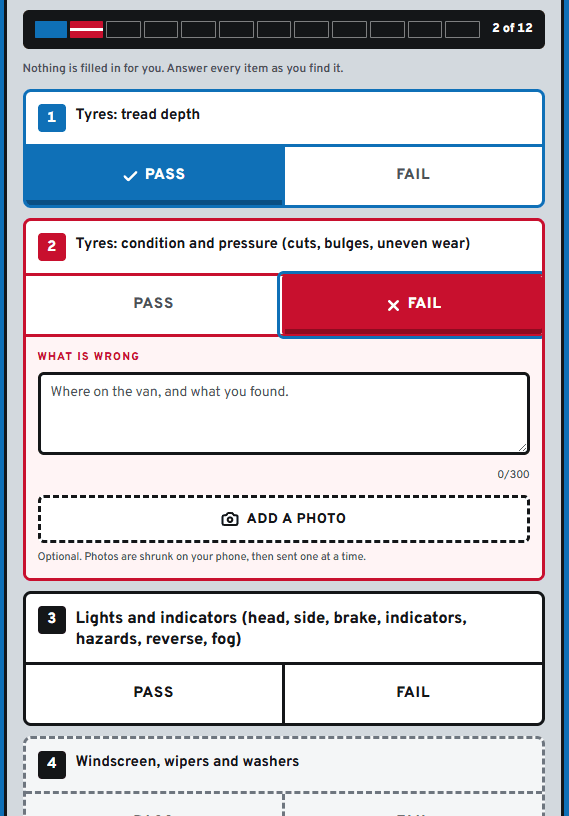
The check is a list of twelve items Ultra Vision signed off, from tyres and lights to the first aid kit. Nothing is ticked in advance, and the form will not send until every item has an answer. The last thing the engineer ticks reads: "I confirm I have physically carried out the checks above on this vehicle today and that the answers given are accurate."
A failed item needs a description, and the engineer can add photos from their phone. The photos arrive attached to the email the fleet manager gets, so the fault can be looked at from a phone without opening the spreadsheet.
It is the third internal tool we have built for Ultra Vision. The first two, a live call board for their office and an out-of-hours call logger, are in the Ultra Vision case study.
Why track the van, not the driver?
Because the van is what needs checking, and who drives it changes. Ultra Vision have spare vans, a van can spend weeks at the garage, and engineers move to another van while theirs is being serviced. A check tied to a person cannot tell you whether a given van was checked this week. A check tied to the van can.
So the form answers one question: has this van been checked this week? If not, the van shows up in the office emails, and the fleet manager decides what to do about it. The form never needs to know about holidays, swapped vans or a van in the garage.
The form still records who did each check, whether that is the engineer who drives the van or someone in the office checking a spare. What it files everything under is the van: each has its own sheet, so its whole history reads top to bottom without filtering.
How do you stop a check landing on the wrong van?
Have the driver type the registration instead of picking it from a list. On a list, one mis-tap makes two errors: the van that was checked shows as not done, and a different van is logged with the wrong details.
On Ultra Vision's form, the typed registration is checked against the company's own list of vans. Spaces and capital letters make no difference, so a correct registration is never turned away for how it was typed.
Once it matches, the van's make and model appear on screen before the form will send. That catches the one mistake the list check cannot: a real registration typed in place of another. It matters here, because two of Ultra Vision's registrations differ by a single character.
Who should be chased when a van has not been checked?
The one person who knows who has which van this week. At Ultra Vision, that is the fleet manager.
Engineers get one automated reminder, on Monday, and no more. A second and third email about the same van, sent to someone out on jobs all day, is easy to stop opening. So the chasing goes to the office instead. An email on Tuesday lists the vans not yet checked, and a more urgent one follows on Thursday, ahead of the Friday deadline.
The office emails list registrations, not names, because the person responsible for a van changes. Someone is on holiday, off sick, or covering two vans. The fleet manager knows who has each van this week, so can phone the right person and make sure it gets done.
The office email still goes out when every van is done. If it went quiet instead, the fleet manager could not tell a week with every van checked from a week the email failed to send.
Every van has its own record now, so we can see which ones still need checking, even when the engineers swap vans. Anything they find comes through to the office quickly, which keeps them safe on the road and keeps maintenance costs down.
Vicki Hobbs, Admin Manager at Ultra Vision Fire & Security
The reminders were switched on recently, so we cannot yet say what difference they make.
Questions
- How often should van drivers check their vehicle?
- GOV.UK's guidance for van drivers is to do a walkaround check before the journey. A weekly check does not replace that: it makes sure a check is recorded, and seen by someone who can act on it, every week.
- Do drivers need an app to do vehicle checks?
- No. Ultra Vision's engineers do theirs on a web form on their phone, with no account to create and nothing to install.
- What happens when a van check finds a fault?
- On Ultra Vision's form, a failed item cannot be sent without a description, and the engineer can attach photos. Both arrive in an email to the fleet manager, photos attached, so the fault can be looked at from a phone.
Sources
- Carry out van daily walkaround checksDriver and Vehicle Standards Agency