
A live callboard and out-of-hours logging for Ultra Vision
Ultra Vision Fire & Security / Gloucester
Ultra Vision are a family run fire and security firm in Gloucester. Intruder alarms, CCTV, fire systems, access control and gates, with callouts answered 24 hours a day, 365 days a year. We built two things for them: a board that shows the office what is waiting, and a way for engineers to log a callout from their phone at night.
The situation
What was happening before
The office already had a shared spreadsheet and everyone had it open. That was never the problem. A spreadsheet gives you rows, and rows do not tell you what has been sitting there since yesterday morning.
New calls go in as they come, so the oldest job on the list ends up furthest down the screen, which is the opposite of where your eye needs to be. A job logged first thing and one logged five minutes ago look identical in a row of cells. Anything from the previous evening or the weekend sits on a different tab again, so getting the full picture means looking across a few days of tabs and holding it all together in your head.
The team did that, and did it well. It just meant the office ran on asking. "Have you done that call?" "Are you doing this one now, or shall I?" That works, but it is constant, and it puts the running order of the day in a couple of people's heads instead of somewhere everyone can see it. If ten jobs are waiting, the whole team should be able to see that at a glance rather than a few people carrying it.
What we looked at first
The brief was the board. The logger came out of a conversation that was not about the brief: while we were going through how the office runs, the out-of-hours side came up in passing, more an aside than a complaint. It turned out to be the bigger of the two problems.
That is why we talk to more than one person, and to people on different sides of the business. Everyone knows what is slow in their own day. Very few people know what somebody else's day looks like, so no one person can tell you which problem is worth solving first.
We also decided early that the spreadsheet was not the problem and did not need replacing. It is the record, everyone knows how to use it, and it works. What was missing was a way to see it. So the board reads that sheet, the logger writes to it, and the sheet stays exactly where it always was.
What we built
The board
A screen on the wall showing every live job as a tile, big enough to read from across the room.
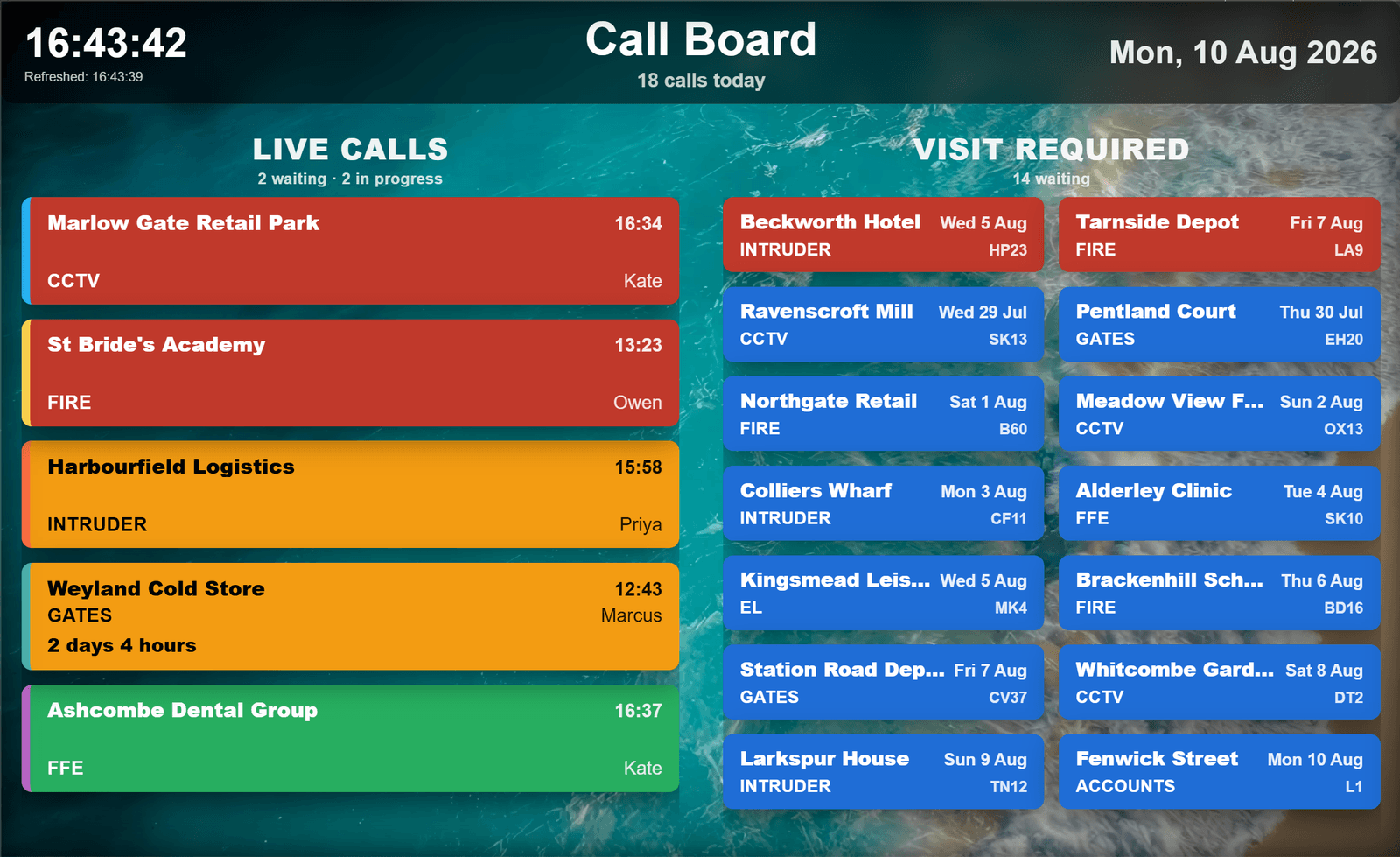
Colour does two jobs at once. The tile colour is status: red is waiting, amber means someone is on it, green is done. The stripe down the side is the type of work: fire, intruder, CCTV, gates and the rest. You get what is waiting and what sort of job it is in the same glance, without reading a word.
Everything still open sits above the jobs in hand and the ones already finished, including calls from earlier in the week and from last week's sheet, so nothing disappears because a newer call arrived or the week rolled over. You look up, see what is waiting, and take one. That is the bit that replaced the asking. Amber means it is covered, so nobody doubles up on someone else.
Age is shown rather than implied. Anything waiting more than two hours starts pulsing, and it keeps its colour while it does, so a job someone is already out on never looks abandoned. Anything still open after a day says how long it has been sitting.
It updates itself every 30 seconds straight from the workbook, so nobody refreshes it and nobody has to open it in the morning.
Nights and weekends
The engineer on call takes the phone at home, or in the van, or in bed. Before the logger they had two ways to record it and neither was quick.
One was to open the Excel app on a phone, find the right tab, scroll to the right row and type into individual cells, half asleep and usually on a bad signal.
The other, and the one that happened a lot, was to email the details through to one person in the office. She then started every morning with overnight callouts sitting in among the rest of her inbox: finding them, reading them, working out which needed to go first, and putting them into the sheet before the day could get going.
She got through it and the right jobs got prioritised. Nothing was going wrong. It just meant the overnight picture rested on one person doing a careful triage first thing, with the rest of the office waiting for her to finish before they could see it. Getting to the right job first matters in this trade, and an inbox is not built for that.
The out-of-hours logger
The test for this one was simple. It had to be at least as easy as sending that email, or nobody would use it at two in the morning.
It is a web page built for a phone. One bookmarked link, nothing to install, nothing to log into. Three things to fill in: the customer or site, who is logging it, and what the call is about. Then the type of work, and whether it is urgent. The call number, the date and the status fill themselves in, because they are admin rather than information, and nobody should be typing them out at night.
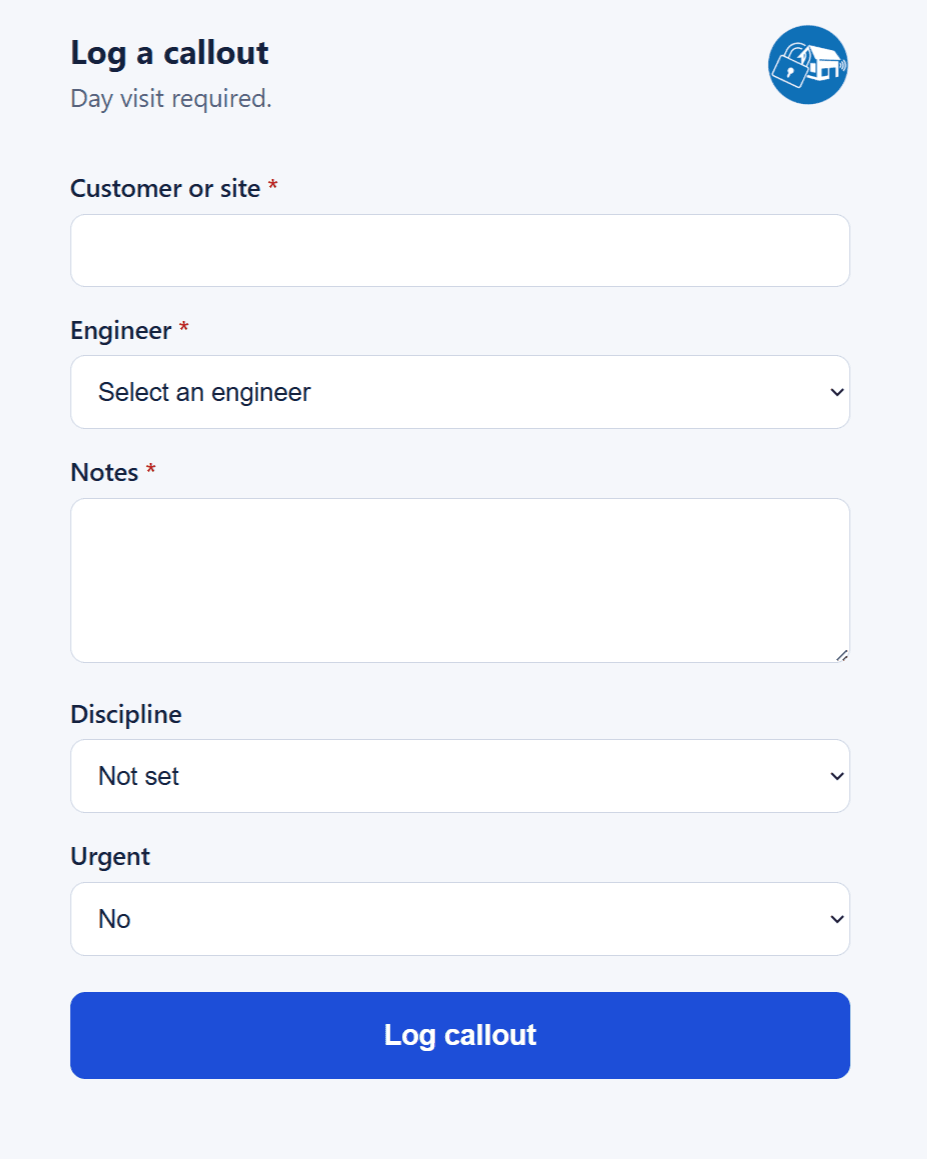
Same effort as the email. The difference is where it lands. It goes straight into the workbook the office has always used, and the board picks it up within half a minute. Mark it urgent and the tile comes up red at the top of the board, so whatever the engineer was worried about overnight is the first thing anyone sees when they walk in. The overnight picture is ready before the office gets in, rather than being put together once they do.
The engineer also gets a confirmation email with the call number and everything they logged. It only sends once the callout is confirmed written to the sheet, so if it arrives, the job is logged. At that hour you want to stop thinking about it, not check again in the morning.
The result
What changed
Logging a callout out of hours
Before
A few minutes
on a spreadsheet
After
About fifteen seconds
on a phone
Rob's own figures. They are also getting to customers quicker than they were.
- The whole office works off the same picture. If ten jobs are waiting, that is on the wall, not in somebody's head.
- Nobody has to ask who is doing what.
- Overnight and weekend callouts are on the board in priority order before anyone gets in.
- Nothing new to pay for: both run on the Microsoft 365 account and the workbook Ultra Vision already had.
In Rob's words
Our engineers log a callout from their phone in a few taps rather than editing a spreadsheet at two in the morning. It appears on the board straight away, and they get a confirmation through so they know it is done.
We are reliably getting to customers quicker than we were before, and what used to take the engineers a few minutes of opening up a spreadsheet in the middle of the night now takes about fifteen seconds on their phone.
Rollout
There was no training session, no downtime, and no period where the old way ran alongside the new one. The board went on the wall and started showing the calls the office was already typing into the spreadsheet. There was nothing for anyone to learn, because nothing about the way they work changed.
The logger went to one engineer first, for a week. If it was going to be awkward to use in the middle of the night, that is where it would have shown. It was not, so it went to the rest of them after that. They each got a link to bookmark, and that was the whole rollout.
What happened after it went live
Some of it we only found out in daily use. The sheet it reads is a live working document, so it moves: dates and times typed slightly differently, the odd row that does not look like the others, edge cases nobody would think to describe to you. Those surfaced in production and got fixed as they came up.
Testing beforehand does not catch every one of those. Real use does, so we stayed with it and fixed them as they appeared. The board has been on the wall since the spring and the logger since July. Day to day, neither of them needs anything from us.
Further reading
- What an out of hours callout log needs to hold, and what makes engineers use it
The five fields Ultra Vision's out of hours callout log holds, which of them fill themselves in, and why adding one more field made it quicker to fill in at night.
- How to get van drivers to do vehicle checks: follow the van, not the driver
How Ultra Vision's weekly van checks work: a web form with no login, a record for each van, and the chasing sent to the fleet manager, not the engineers.
Not sure what to automate first?
That is usually the best place to start. Tell us where the friction is, and we will tell you honestly what is worth building.
- A reply usually the same day
- An honest view before any work starts
- No sales pitch, no obligation